Product Design · SELLIT9 · 2026
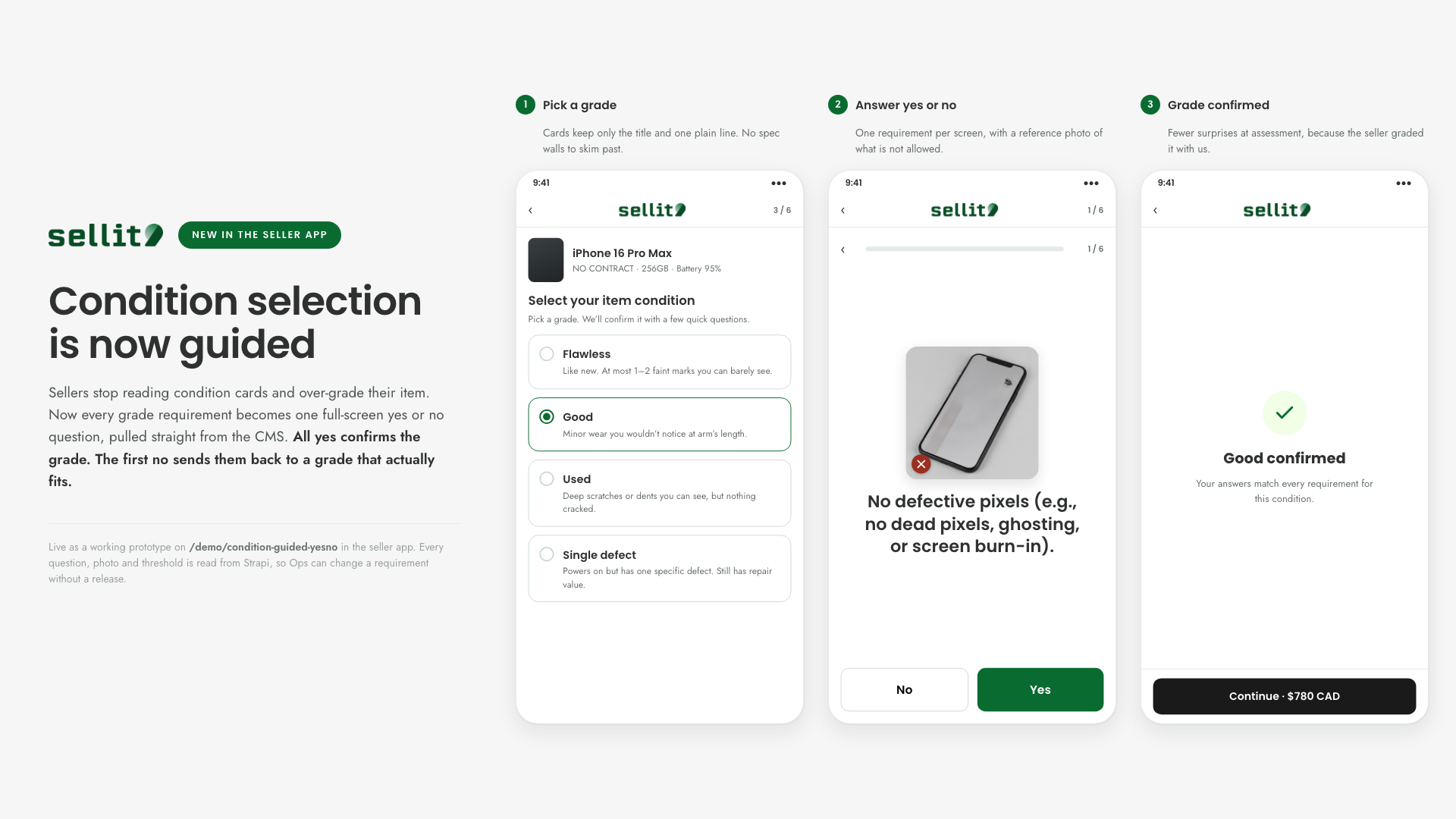
Turning the funnel's most-abandoned decision into a guided quiz
Reframed item-condition selection from a static side-by-side comparison into a short sequence of confident yes/no questions.
- Role
- Senior Product Designer
- Duration
- A/B test in preparation
- Tools
- Figma · HTML/CSS prototypes · GA4 · Microsoft Clarity
Impact & results
- Turned an ambiguous comparison task into a sequence of confident, answerable questions
- Built both variants (comparison cards vs. guided quiz) personally, at production fidelity, ready to test
- A/B test in preparation, planned as a staged rollout starting at 10% of users in a single category
This experiment hasn't launched yet — it's currently in preparation for a staged rollout. Results will be added here once it runs.
The challenge
Condition selection was a static comparison-cards step, and 40% of users dropped off at exactly this point in the funnel. Two forces looked responsible: visible per-tier prices may have nudged people toward the answer that paid more rather than the one that was true, and each card packed in enough text that people stopped reading, either hunting straight for the best price or hitting cognitive overload and leaving. It wasn't only a drop-off problem either: at least 10% of order cancellations traced back to users grading their own item's condition wrong.
The solution
Moved the self-assessment burden from the user to SELLIT9: a short sequence of audited yes/no questions, one requirement at a time, with no price shown until a condition is confirmed, closing the price-bias loophole and cutting the cognitive load of reading dense comparison cards.
Try it yourself
This is the real, working flow — tap a condition card to start the questions, answer honestly, and see where it lands. Rendered in SELLIT9’s own product UI, not a portfolio mockup.
Condition step · Guided Yes / No
People don't read the condition cards and over-grade. This variant turns each requirement into one full-screen yes / no question, framed on mobile. Tap the cards and buttons — they're interactive.
2 · Guided Yes / No. Cards show only title + description. Select one to start the questions: one full-screen yes / no per spec, straight from Strapi. All yes → selected. First no → back to pick a condition that fits.
 3 / 6
3 / 6
Select your item condition
Pick a grade — we’ll confirm it with a few quick questions.
This is a test build for demonstration purposes, not the final production version. The live version of this flow is reserved for SELLIT9’s platform.
The Next Version — One Elimination Engine, Every Category
Where V1 walks one product through a fixed set of questions, V2 is an elimination engine: every answer objectively rules condition tiers in or out, live, in the tracker on the right, until one tier is left standing.
The questions themselves change by category, not just the product name in the copy. Phones and tablets get a battery-health check; headphones get a hygiene question cards never asked; drones add a structural flight-safety check before anything cosmetic; single-tier items like PC components skip condition questions entirely. Use the product picker above the quiz to switch categories and watch both the questions and the tracker change with it.
Side note: the elimination tracker is shown here so the logic behind each answer is visible, letting you see exactly how one response narrows down the possible conditions. It’s a technical view for this demo, not part of the live product; a real user would only ever see the questions and the final result.
 Condition Test · Prototype
Does your Apple iPhone power on and work fully?
No cracks, no dead pixels or screen defects, and everything functions.
This is a test build for demonstration purposes, not the final production version. The live version of this flow is reserved for SELLIT9’s platform.
How these were built
Both interactive prototypes above, the guided quiz and the elimination engine, were coded autonomously in VS Code with Claude Code as the AI pair-programmer, no developer involved. The implementation came from my own understanding of the product’s back-end logic and architecture, not a developer hand-off. Both are ready to hand off to front-end engineering as-is.
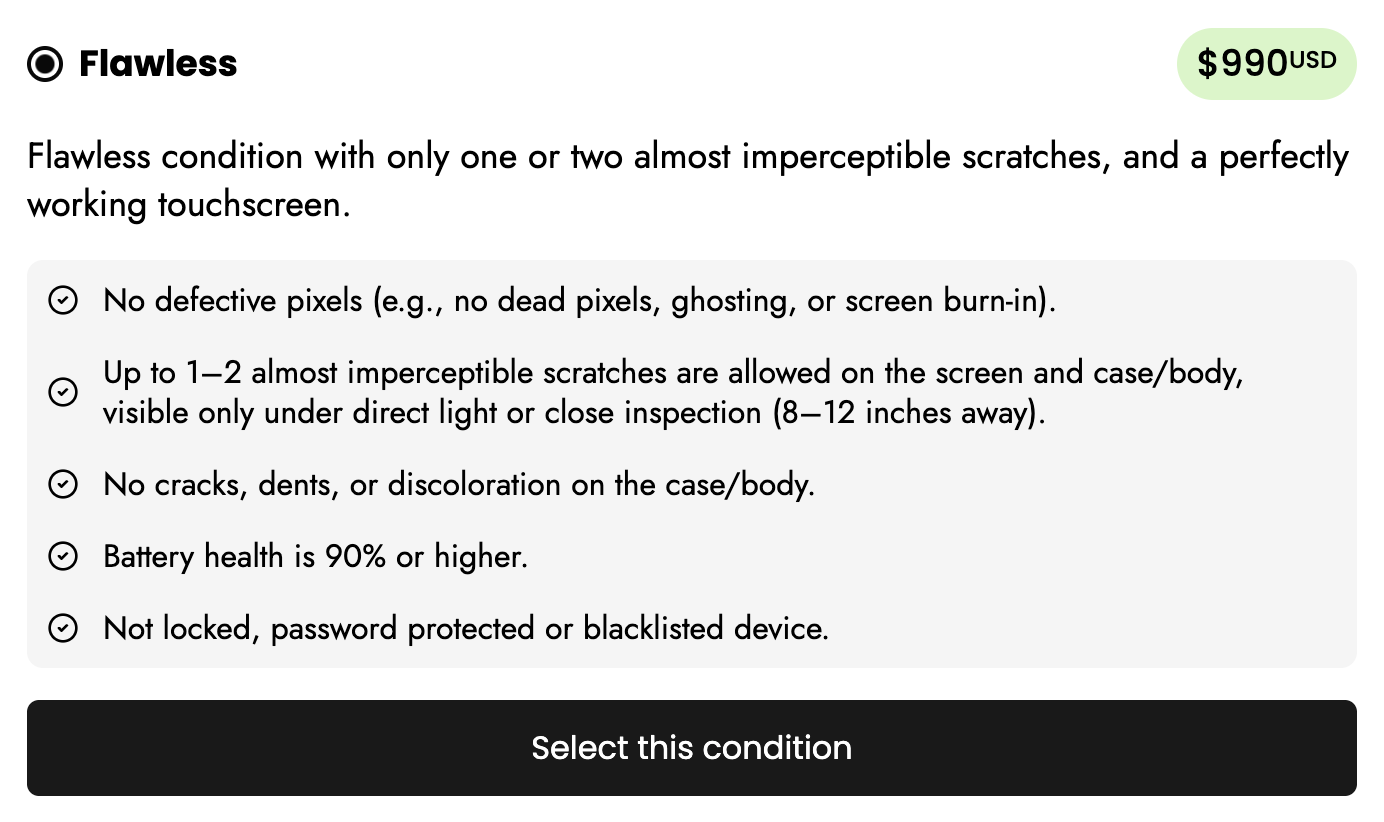
The Condition Card, As Shipped Today
The live comparison-card step: price visible before the condition is even chosen, and a dense checklist standing between the user and a decision.
The full process
- 1
The Problem — 40% Drop Off at One Step
Static comparison cards asked users to place their own item against several condition tiers at once, without a reliable reference point — and 40% of users dropped off at exactly this step, more than any other in the funnel.
Two Working Hypotheses
- Visible per-tier prices may have nudged users toward the answer that paid more, not the one that was true
- Each card packed in enough spec text that people stopped reading it, either hunting straight for the best price or hitting cognitive overload and leaving
A Second Cost — Bad-Grading Cancellations
- At least 10% of order cancellations traced back to users grading their own item's condition wrong
- Self-assessment wasn't only costing completions at this step, it was costing orders that had already gone through
- 2
The Reframe — Self-Assessment Shouldn't Be the User's Job
If self-grading was unreliable and heavy to read, the fix wasn't a better comparison table, it was removing the comparison altogether. The condition-determination burden moved from the user to SELLIT9: instead of asking someone to self-assess against four dense tiers at once, audited yes/no questions guide them to the right tier one requirement at a time, cutting the cognitive load down to a single decision per screen.
- 3
The Solution — A Guided Quiz
Key Actions
- Designed a short sequence of mutually exclusive yes/no questions
- Mapped every answer path to a single, unambiguous condition tier
- Removed per-tier pricing from the flow until a condition is confirmed, closing the price-bias loophole
- Built both the original cards and the new quiz as production-fidelity variants, ready to test
- 4
Roadmap — V1 to V2
V1, built and ready to test, asks one question per requirement: 4 to 6 questions depending on the grade. It was scoped deliberately to ship on front-end changes alone, no backend or architecture work, so the hypothesis could be validated fast. V2 is scoped to compress that down to a fixed 4 questions regardless of grade, but it needs real backend investment, not just front-end iteration.
The Gate Between Them
- V1 was the cheapest way to test whether guided questions actually held more users through the funnel to a placed order, and whether the bad-grading rate dropped
- If both moved in the right direction, that would be the signal to justify V2's heavier technical investment for a more stable, more user-friendly flow
- 5
Status — Preparing a Staged Rollout
The test is proposed to launch in bulks rather than all at once: the first bulk holds it to 10% of users in a single category, for a controlled read on impact before it touches anything else. Later bulks expand from there as results are measured and the flow is corrected. It's currently in preparation to run, and will be measured through GA4 funnel data and Microsoft Clarity session replay once live.